How should I test my React components?
17.07.2018
I have this thing where I start writing blog posts, but never finish them because I just want to put too much in them.. So, this is yet another attempt, but this time I am going to try and scope it way down and just describe my journey of finding out how to properly test my React apps!
Background
This is actually something I've been working around for some time now and feel my skill level with React has now come to a point where I am comfortable enough to spend some time of getting testing right.
A little background on my experience with testing in JS thus far:
- I've done enough work in NodeJS to be comfortable enough in applying a Test-Driven Development way of working; codebases I've built have +95% test coverage and I've experienced how this approach can save you time on the long run. Especially when you get to a point where you want to refactor some of your code etc.
- Testing tools: I've used Mocha, Chai and Sinon, and later migrated to Jest.
- In React I've picked up 2-3 (hobby) projects and I am now building a small React native app. I've gotten accustomed to splitting up my components into (stateful) Containers and (stateless) Components and have recently experienced why a centralized state manager (aka Redux) could be very helpful; yes, you will have to actually build something and run into some scenarios where you'll have to add unnecessary complexity to understand why you would need this.
Here we go!
Ok, first things first. What do I want to test? I want to start off with Unit-tests for my components and their stateful counterparts. Questions I want answers to:
-
Stateless Components
- How do I properly test that changing a property has the desired effect?
- Should I test how data is represented in the resulting output?
- What about triggering event handlers?
-
Stateful Components
- How do I properly test that specific actions / action handlers have the desired change in state?
- Should I test that the right properties are passed to my stateless component? And how?
-
Backend services / interaction
- How can I best mock my backend? Should I implement some
TESTmode or should I just define the response I expect? - How do I do proper error handling and how do I test this?
- How can I best mock my backend? Should I implement some
Stateless components
I am going to start off with one of my simpler stateless components in a React Native app I've been working on. The component displays a header, a corresponding TextInput, and an error message that is shown when set.
const MyTextInput = ({
  label,
  placeholder,
  name,
  value,
  error,
  onChange,
  onBlur,
  keyboardType = 'default',
}) => (
  <View>
    <Text style={styles.headerText}>{label}</Text>
    <TextInput
      style={styles.textInput}
      placeholder={placeholder || ''}
      onChangeText={newText => onChange && onChange({ [name]: newText})}
      onBlur={() => onBlur && onBlur({ [name]: value })}
      value={value}
      // Make sure we don't show Android's default bottom border
      underlineColorAndroid='transparent'
      keyboardType={keyboardType}
    />
    {!!error &&
      <Text style={styles.errorMessage}>{error}</Text>
    }
  </View>
);
Looking at this component, I want to confirm that the following statements are correct:
describe('[Component] MyTextInput', () => {
  describe('Header', () => {
    it('should show the header text set', () => {});
  });
  describe('TextInput', () => {
    it('should show the placeholder', () => {});
    it('should show the value set', () => {});
    it('should show the keyboardType configured', () => {});
    it('should call the onChange function when text changes', () => {});
    it('should call the onBlur function when the component loses focus', () => {});
  });
  describe('error', () => {
    it('should show an error message when set', () => {});
    it('should hide the error message when not set', () => {});
  });
});
Now, let's start filling those test cases.
Snapshots!
This is where I had my first discovery: We can use react-test-renderer to render our component to a JSON representation, and then verify that this representation matches some snapshot we have taken from the component at a point where we were happy with how it looked. So let's do that.
it('renders correctly', () => {
  const tree = renderer.create(<MyTextInput />).toJSON();
  expect(tree).toMatchSnapshot();
});
Running this test will add a folder __snapshots__, which will contain JSON representations of the components we snapshot. Now whenever we make changes to the component, this test will check if the snapshot (= the JSON representation of the component) is still the same. This means that if we make changes that will result in a different snapshot, the test will fail and we will have to determine if this was intended and replace the snapshot, or if this was an unintended side-effect of our changes.
Is this what we want to test?
I had some doubts about this at first, because what are we really testing this way? Sure, it is a good way to make sure we're not introducing unintended side-effects, but I actually want to go a bit further. What about verifying that if I change a property such as the label, it will show the different label? Well, snapshots will actually work for that as well!
Basically, we set up our components with the snapshot of how it should render. These snapshots are committed as part of your code, which means that whenever changes are made to components that impact the snapshot, the changes will be part of the PR submitted. And thus, hopefully, part of the code to review.
What dawned on me while on a hike the other day is that with non-snapshot tests we are actually doing the same. We capture a desired state of a component when passing certain properties to it by writing assertions that our code in fact does what we expect it to do. Now what snapshots does for us is exactly that: it captures the state for the properties passed to it. The difference now is that instead of updating our tests when we make changes in this desired behavior, we just confirm that the changes in the snapshot are valid and store the new snapshot. It really just removes the necessity of manually adding our assertions in the tests.
The argument to use snapshots instead of "manual" tests is that if we write the assertions for all kinds of properties ourselves, we are duplicating a lot of our rendering code from the component in our tests. And of course with everything that is repeated, those tests would need updating with every change we make to the component. So let's just focus on snapshotting the component with some different properties!
Need more convincing? I found this article pretty helpful.
Let's snapshot away!
describe('[Component] MyTextInput', () => {
  describe('Header', () => {
    it('should show the header text set', () => {
      expect(renderer.create(
        <MyTextInput
          label='My header'
        />
      )).toMatchSnapshot();
    });
  });
  describe('TextInput', () => {
    it('should show the placeholder', () => {
      expect(renderer.create(
        <MyTextInput
          placeholder='My placeholder'
        />
      )).toMatchSnapshot();
    });
    it('should show the value set', () => {
      expect(renderer.create(
        <MyTextInput
          value='My value'
        />
      )).toMatchSnapshot();
    });
    it('should show the keyboardType configured', () => {
      expect(renderer.create(
        <MyTextInput
          keyboardType='numeric'
        />
      )).toMatchSnapshot();
    });
  });
  describe('error', () => {
    it('should show an error message when set', () => {
      expect(renderer.create(
        <MyTextInput
          error='My error message'
        />
      )).toMatchSnapshot();
    });
  });
});
Event handlers
Ok cool! Our snapshots are recorded and we are now in control of any changes to the output. There's still a part we haven't covered in our tests though: we want to validate that our component also behaves in the way we expect it to. Our component has two places where this is relevant: the onChange and onBlur event handlers. Indeed, our test coverage report shows that these have not been covered yet:
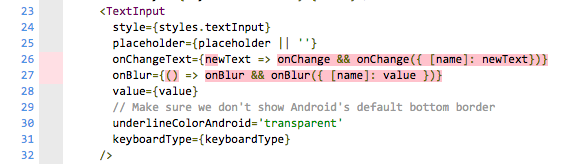
Let's write a test that validates that the passed event handlers are called with the params we expect; an object with a property passed in through the name property, with the new value.
In order to trigger the events in our tests, we need some way to change the text and focus while running it. For this we use enzyme to render the component, find our TextInput element, and simulate the ChangeText and Blur events.
it('should call the onChange function set when text changes', () => {
  const onChangeMock = jest.fn();
  const wrapper = shallow(
    <MyTextInput
      name='myRefName'
      onChange={onChangeMock}
    />
  );

  // simulate a text change
  wrapper.find('TextInput')
    .simulate('ChangeText', 'myNewText');

  expect(onChangeMock.mock.calls.length).toBe(1);
  expect(onChangeMock.mock.calls[0][0]).toEqual({
    myRefName: 'myNewText',
  });
});
it('should call the onBlur function when the component loses focus', () => {
  const onBlurMock = jest.fn();
  const wrapper = shallow(
    <MyTextInput
      name='myRefName'
      onBlur={onBlurMock}
      value='myValue'
    />
  );

  // simulate a text change
  wrapper.find('TextInput')
    .simulate('Blur');

  expect(onBlurMock.mock.calls.length).toBe(1);
  expect(onBlurMock.mock.calls[0][0]).toEqual({
    myRefName: 'myValue',
  });
});
Cool! Up to 100% test coverage! Now let's do some refactoring, because I don't like how often I am re-rendering this component to test all of the snapshots and functionality.
import React from 'react';
import { configure, shallow } from 'enzyme';
import Adapter from 'enzyme-adapter-react-16';

import MyTextInput from '../MyTextInput';

configure({ adapter: new Adapter() });

describe('[Component] MyTextInput', () => {
  const onChangeMock = jest.fn();
  const onBlurMock = jest.fn();

  const wrapper = shallow(
    <MyTextInput
      label='My header'
      placeholder='My placeholder'
      name='myRefName'
      value='My value'
      keyboardType='email-address'
      onChange={onChangeMock}
      onBlur={onBlurMock}
    />
  );

  it('renders as expected', () => {
    expect(wrapper).toMatchSnapshot();
  });

  it('should call the onChange function set when text changes', () => {
    // simulate a text change
    wrapper.find('TextInput')
      .simulate('ChangeText', 'myNewText');

    expect(onChangeMock.mock.calls.length).toBe(1);
    expect(onChangeMock.mock.calls[0][0]).toEqual({
      myRefName: 'myNewText',
    });
  });

  it('should call the onBlur function when the component loses focus', () => {
    // simulate losing focus
    wrapper.find('TextInput')
      .simulate('Blur');

    expect(onBlurMock.mock.calls.length).toBe(1);
    expect(onBlurMock.mock.calls[0][0]).toEqual({
      myRefName: 'My value',
    });
  });

  it('should show an error message when set', () => {
    expect(shallow(
      <MyTextInput
        label='My header'
        name='myRefName'
        value='My value'
        error='My error message'
      />
    )).toMatchSnapshot();
  });
});
Note how I am now doing two renders instead of a render per test. I basically replaced all of my individual test cases with a catch-all "make sure this renders ok" test case. I am not sure yet which I prefer; individual test cases that help me more accurately pinpoint changes in snapshots, at the cost of more code and snapshotting (including the duplication across snapshots), or this single render in which I pass all of my properties.
Oh BTW, also note that the second render I do now is to cover the error case. Our component has a conditional part dependent on if error is set. So to make sure we cover all execution paths, we will have to render the component both with and without an error message.
Note that after this refactor we actually got an error because the snapshots did not match our initial snapshots. After confirming that the differences between the snapshots made sense, we ran npm test -- -u to update our stored snapshots and commit all of our work (including snapshots!).
To summarize
Yes, I did it! A full blog post ready for release! Let's get back to my questions to summarize our findings.
-
Stateless Components
- How do I properly test that changing a property has the desired effect?
We use snapshots to take control over changes in our component's output. Snapshots should be committed to source control and changes in a snapshot are part of a PR for review.
- Should I test how data is represented in the resulting output?
Yes! This is all part of the snapshot. Additionally we can use
enzymeto check for the existence of specific data in a rendered component.
- What about triggering event handlers?
We can mimic user interactions (such as a text change or a component losing focus) with enzyme. We can then assert the callbacks to be called just like we do with regular tests.
For the sake of scoping this article, we will leave our questions regarding stateful components and interaction with backend services for later articles.
References
Some sources I've used: